PILOT: examples explained
Maturity and boundaries: experimental
Implemented scope: Text, input, calculations, matching, jumps, subroutines and numeric QUAD binding are covered by the examples.
Boundary: The PBXB64 PILOT dialect has bounded input, expression and stack capacities; its shared return stack is not thread-safe.
PILOT supported commands and scope
Browse the language-specific supported-command and scope reference, with searchable categories and explicit boundaries.
Open scope referencePILOT uses prefixes such as C: for calculations, T: for text and J: for jumps. #names are numeric variables; $names identify strings.
Twelve short examples and one larger program. Choose a topic or work through the examples in order.
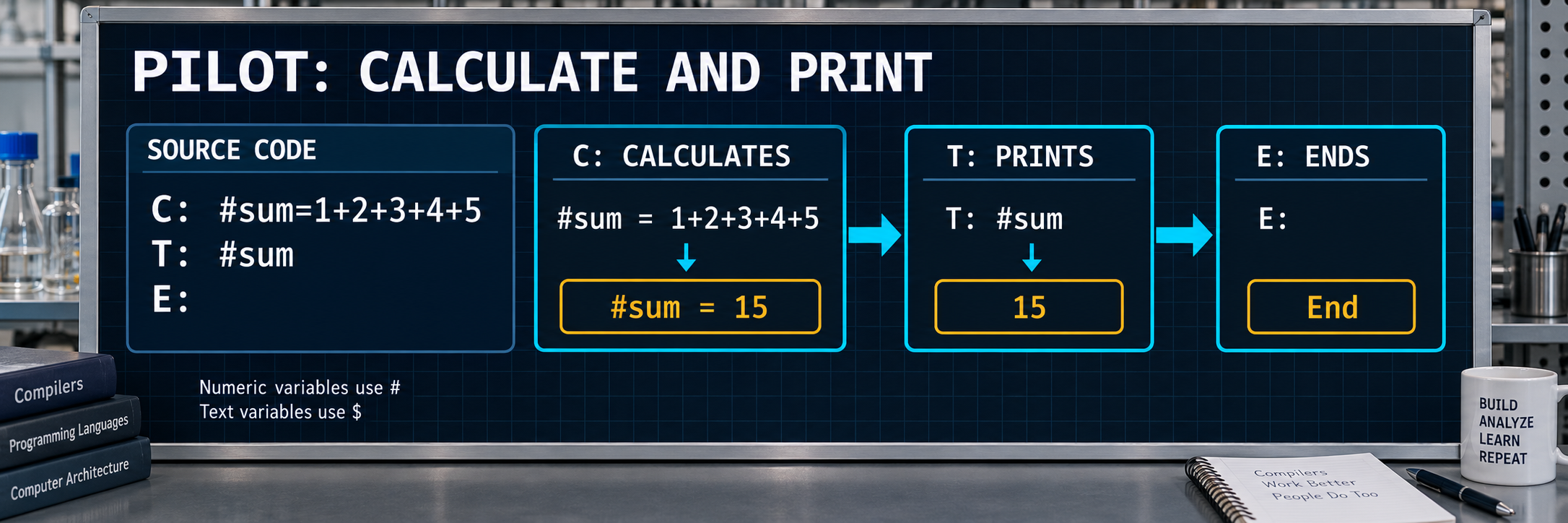
1. 1 + 2 + 3 + 4 + 5 = 15
The numbers 1 through 5 are added to 15. The program prints 15 and ends with exit code 0.
C: #sum=1+2+3+4+5
T: #sum
E:
Expected exit code: 0; output verification pattern (regex): '15'
PBXB64.exe sum15-pilot.pil -O2 -o example.exe
.\example.exe
$LASTEXITCODE
Executed natively with the V22 candidate from 2026-09-30; final-compiler verification pending.
2. J: jump to a label
J: *target skips the wrong output. Execution resumes at *target and T: prints jumped. R: is a remark; E: ends the program.
R: Test unconditional jump
J: *target
T: "wrong"
*target
T: "jumped"
E:
Expected exit code: 0; output verification pattern (regex): 'jumped\n'
PBXB64.exe pilot_jump.pil -O2 -o example.exe
.\example.exe
$LASTEXITCODE
Canonical test case with an expected result; no new native V22 check here. Final execution pending.
3. Text in a string variable
C: assigns variable text to $MSG. T: $MSG prints the stored string. The $ prefix distinguishes it from the numeric #sum in the introductory example.
R: Test text with string variable
C: $MSG = "variable text"
T: $MSG
E:
Expected exit code: 0; output verification pattern (regex): 'variable text\n'
PBXB64.exe pilot_text_var.pil -O2 -o example.exe
.\example.exe
$LASTEXITCODE
Canonical test case with an expected result; no new native V22 check here. Final execution pending.
4. A complete hello program
Step-by-step flow
- R: contains a remark and produces no output.
- T: prints quoted text Hello from PILOT.
- E: ends the program with expected exit code 0.
R: Basic PILOT test - hello world
T: "Hello from PILOT"
E:
Expected exit code: 0
Canonical output verification pattern (regex)
Hello from PILOT
PBXB64.exe pilot-pilot_hello.pil -O2 -o example.exe
.\example.exe
$LASTEXITCODE
Expected-result contract from tests/validate.toml. This website expansion adds no new native compiler verification. Execution with the qualified final compiler remains pending.
5. One literal text line
Step-by-step flow
- The text after T: is a string literal.
- No variable is evaluated or substituted.
- The concrete output contract contains Single text line followed by a newline.
R: Test text output with string literal
T: "Single text line"
E:
Expected exit code: 0
Canonical output verification pattern (regex)
Single text line
PBXB64.exe pilot-pilot_text_literal.pil -O2 -o example.exe
.\example.exe
$LASTEXITCODE
Expected-result contract from tests/validate.toml. This website expansion adds no new native compiler verification. Execution with the qualified final compiler remains pending.
6. One line assembled from three text parts
Step-by-step flow
- T: receives Hello, a space and World as separate parts.
- Commas separate arguments rather than output lines.
- The parts combine into Hello World.
R: Test multi-part text with literals
T: "Hello", " ", "World"
E:
Expected exit code: 0
Canonical output verification pattern (regex)
Hello World
PBXB64.exe pilot-pilot_text_multi.pil -O2 -o example.exe
.\example.exe
$LASTEXITCODE
Expected-result contract from tests/validate.toml. This website expansion adds no new native compiler verification. Execution with the qualified final compiler remains pending.
7. TRUE and FALSE as numeric constants
Step-by-step flow
- #A and #B identify numeric variables.
- C: assigns TRUE and FALSE respectively.
- The program demonstrates constant spelling and ends without T: output.
R: Test TRUE and FALSE constants
C: #A = TRUE
C: #B = FALSE
E:
Expected exit code: 0
PBXB64.exe pilot-pilot_constants.pil -O2 -o example.exe
.\example.exe
$LASTEXITCODE
Expected-result contract from tests/validate.toml. This website expansion adds no new native compiler verification. Execution with the qualified final compiler remains pending.
8. Copy numbers and assign signed values
Step-by-step flow
- #A receives 42; #B copies the current value of #A.
- Further assignments demonstrate 0, 1 and -5.
- This is a value copy. A later change to #A would not retroactively change #B.
R: Test number variable assignment
C: #A = 42
C: #B = #A
C: #C = 0
C: #D = 1
C: #E = -5
E:
Expected exit code: 0
PBXB64.exe pilot-pilot_compute_number.pil -O2 -o example.exe
.\example.exe
$LASTEXITCODE
Expected-result contract from tests/validate.toml. This website expansion adds no new native compiler verification. Execution with the qualified final compiler remains pending.
9. Two independent string variables
Step-by-step flow
- The $ prefix distinguishes text variables from numeric #variables.
- C: assigns hello to $S and world to $T.
- Without a T: command, neither text is printed.
R: Test string variable assignment
C: $S = "hello"
C: $T = "world"
E:
Expected exit code: 0
PBXB64.exe pilot-pilot_compute_string.pil -O2 -o example.exe
.\example.exe
$LASTEXITCODE
Expected-result contract from tests/validate.toml. This website expansion adds no new native compiler verification. Execution with the qualified final compiler remains pending.
10. Y: executes for a true state
Step-by-step flow
- C: #A = 1 establishes a true condition state in this contract.
- Y: guards the following T: statement.
- Yes guard with true match is printed on that true path.
R: Test Y: conditional guard (true)
C: #A = 1
Y: T: "Yes guard with true match"
E:
Expected exit code: 0
Canonical output verification pattern (regex)
Yes guard with true match
PBXB64.exe pilot-pilot_yes_true.pil -O2 -o example.exe
.\example.exe
$LASTEXITCODE
Expected-result contract from tests/validate.toml. This website expansion adds no new native compiler verification. Execution with the qualified final compiler remains pending.
11. N: executes for a false state
Step-by-step flow
- C: #A = 0 establishes a false condition state here.
- N: complements the Y: guard and executes the T: statement.
- The expected line is No guard with false match.
R: Test N: conditional guard (true)
C: #A = 0
N: T: "No guard with false match"
E:
Expected exit code: 0
Canonical output verification pattern (regex)
No guard with false match
PBXB64.exe pilot-pilot_no_true.pil -O2 -o example.exe
.\example.exe
$LASTEXITCODE
Expected-result contract from tests/validate.toml. This website expansion adds no new native compiler verification. Execution with the qualified final compiler remains pending.
12. Use M: to choose the true path
Step-by-step flow
- C: #A = 1 supplies the true state for the match branch.
- M: *success jumps to its label, skipping wrong and the first ending command.
- At the target, T: prints matched and E: ends the program.
R: Test match conditional jump (true case)
C: #A = 1
M: *success
T: "wrong"
E:
*success
T: "matched"
E:
Expected exit code: 0
Canonical output verification pattern (regex)
matched
PBXB64.exe pilot-pilot_match_true.pil -O2 -o example.exe
.\example.exe
$LASTEXITCODE
Expected-result contract from tests/validate.toml. This website expansion adds no new native compiler verification. Execution with the qualified final compiler remains pending.
Larger example: Variables, conditions and labels together
Step-by-step flow
- C: creates a string and three numeric values; the last numeric assignment TRUE supplies the true condition state used here.
- T: prints Hello and PILOT Test. Y: prints Yes when true while N: is skipped.
- J: jumps to skip_remark; M: then uses condition state for its match branch. Both ending paths use E:.
R: Comprehensive PILOT test covering all implemented commands
R: Variable assignments
C: $MSG = "PILOT Test"
C: #A = 42
C: #B = 0
C: #C = TRUE
R: Text output
T: "Hello"
T: $MSG
R: Conditional guards
Y: T: "Yes when true"
N: T: "No when false"
R: Jump test
J: *skip_remark
R: This remark is skipped
*skip_remark
R: Match test
M: *match_jump
R: Match was false, continue here
E:
*match_jump
E:
Expected exit code: 0
Canonical output verification pattern (regex)
Hello
PILOT Test
Yes when true
PBXB64.exe pilot-pilot_comprehensive.pil -O2 -o example.exe
.\example.exe
$LASTEXITCODE
Expected-result contract from tests/validate.toml. This website expansion adds no new native compiler verification. Execution with the qualified final compiler remains pending.
All sources for this tutorial
Each example has its own folder; the README lists compiler commands. Included support files retain matching paths.
Download all 13 examples as ZIPBridging
V: establishes a typed binding to a BASIC GLOBAL variable. The example demonstrates QUAD and STRING values and two aliases to the same variable.
Explore complete source pairs