PowerBASIC: examples explained
Maturity and boundaries: production
Implemented scope: Flagship native Windows x64 path; the guided examples cover functions, types, arrays, strings, control flow and PBXB64 compile-time forms.
Boundary: Full PB11 compatibility is not claimed; the compile-time extension surface is limited and V9 has no fresh aggregate qualification.
Supported commands and functions
Browse the complete thematic V23 BASIC command/function reference, with syntax families, help evidence and coverage boundaries.
Open referenceThe BASIC input combines PBMAIN, typed variables and structured statements with PBXB64 extensions. LONG is 64-bit in PBXB64.
Twelve short examples and one larger program. Choose a topic or work through the examples in order.
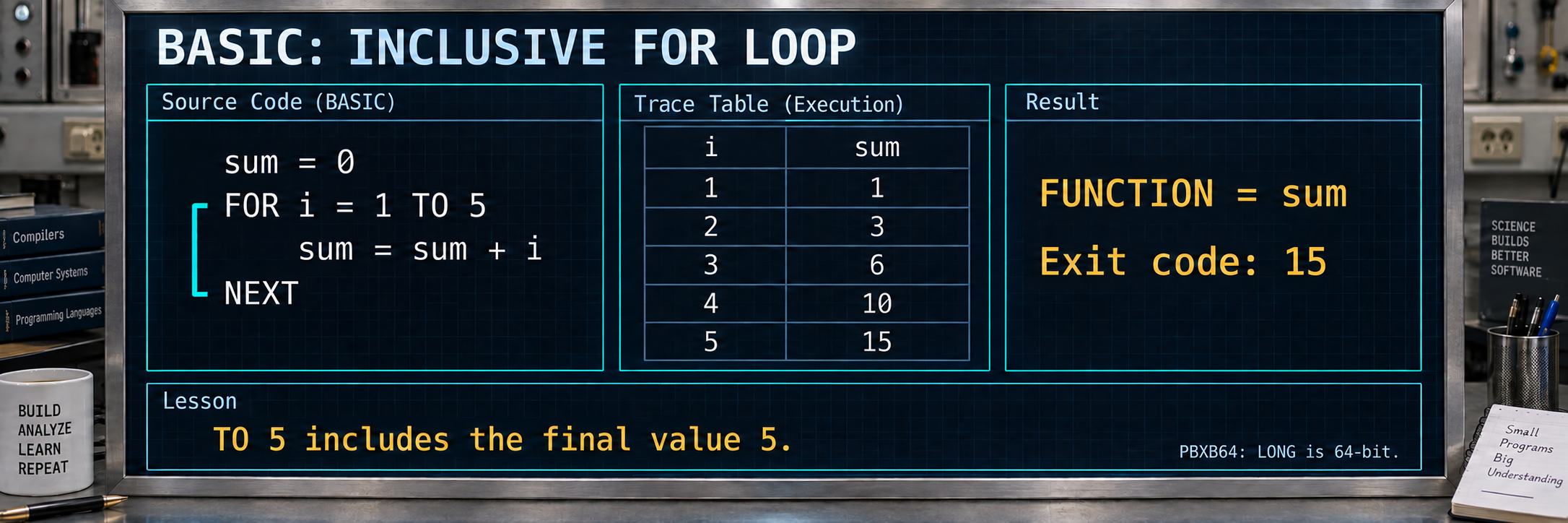
1. 1 + 2 + 3 + 4 + 5 = 15
The numbers 1 through 5 are added to 15. Return value 15 is checked as the process exit code.
FUNCTION PBMAIN() AS LONG
    LOCAL sum AS LONG
    LOCAL i AS LONG
    sum = 0
    FOR i = 1 TO 5
        sum = sum + i
    NEXT
    FUNCTION = sum   ' = 15
END FUNCTION
Expected exit code: 15
PBXB64.exe sum15-powerbasic.pb -O2 -o example.exe
.\example.exe
$LASTEXITCODE
Executed natively with the V22 candidate from 2026-09-30; final-compiler verification pending.
2. DO WHILE: check the result inside the program
The loop adds 1, 2 and 3 to 6. DO WHILE checks before each iteration. Exit code 1 signals a wrong result; exit code 0 means the internal check passed.
#COMPILE EXE
#DIM ALL
FUNCTION PBMAIN() AS LONG
  LOCAL i AS LONG
  LOCAL sum AS LONG
  i = 1
  sum = 0
  DO WHILE i <= 3
    sum = sum + i
    i = i + 1
  LOOP
  IF sum <> 6 THEN FUNCTION = 1: EXIT FUNCTION
  FUNCTION = 0
END FUNCTION
Expected exit code: 0
PBXB64.exe test_do_while_counter.pb -O2 -o example.exe
.\example.exe
$LASTEXITCODE
Canonical test case with an expected result; no new native V22 check here. Final execution pending.
3. Preprocessor: include, macro and #REPEAT
web-defines.inc enables the checked branch. #REPEAT processes indices 0, 1 and 2; the third pass defines SELECTED as 40. ADD(SELECTED, 2) evaluates to 42. Keep the program and include together.
#COMPILE EXE
#DIM ALL
#INCLUDE "web-defines.inc"
#DEFINE ADD(left, right) = left + right
#REPEAT 3 AS %INDEX
 #IF %INDEX = 2
  #DEFINE SELECTED 40
 #ENDIF
#ENDREPEAT
FUNCTION PBMAIN() AS LONG
 #IF ENABLE_WEB_CHECK = 1
  IF ADD(SELECTED, 2) <> 42 THEN PBMAIN = 1 : EXIT FUNCTION
 #ELSE
  PBMAIN = 2 : EXIT FUNCTION
 #ENDIF
 PBMAIN = 0
END FUNCTION
Expected exit code: 0
PBXB64.exe feature-preprocessor.pb -O2 -o example.exe
.\example.exe
$LASTEXITCODE
Executed natively with the V22 candidate from 2026-09-30; final-compiler verification pending.
4. Return a function value
Step-by-step flow
- Foo assigns 42 to its function result.
- main calls Foo and takes its return value.
- FUNCTION = assigns a result here; it does not print anything.
FUNCTION Foo() AS LONG
    FUNCTION = 42
END FUNCTION

FUNCTION main() AS LONG
    main = Foo()
END FUNCTION
Expected exit code: 42
PBXB64.exe powerbasic-test_function_return.pb -O2 -o example.exe
.\example.exe
$LASTEXITCODE
Expectation derived from source; no current registered execution contract. This website expansion adds no new native compiler verification. Execution with the qualified final compiler remains pending.
5. Fixed string fields in a record
Step-by-step flow
- TYPE defines two STRING * 260 fields for filenames.
- The local variable opt holds an instance of that record.
- SourceFile receives test. Exit code 0 checks completion rather than the contents of both fields.
TYPE LegacyCompilerOptions
    SourceFile      AS STRING * 260
    OutputFile      AS STRING * 260
END TYPE

FUNCTION main() AS LONG
    LOCAL opt AS LegacyCompilerOptions
    opt.SourceFile = "test"
    main = 0
END FUNCTION
Expected exit code: 0
PBXB64.exe powerbasic-test_fixed_string_type.pb -O2 -o example.exe
.\example.exe
$LASTEXITCODE
Expectation derived from source; no current registered execution contract. This website expansion adds no new native compiler verification. Execution with the qualified final compiler remains pending.
6. Count down with STEP -1
Step-by-step flow
- FOR starts at 10 and includes the final bound 1.
- STEP -1 decreases i each iteration; g accumulates the values.
- 10 + 9 + ... + 1 is 55, the program's return value.
FUNCTION PBMAIN() AS LONG
    LOCAL g AS LONG
    LOCAL i AS LONG
    g = 0
    FOR i = 10 TO 1 STEP -1
        g = g + i
    NEXT
    FUNCTION = g
END FUNCTION
Expected exit code: 55
PBXB64.exe powerbasic-for_int_negstep.pb -O2 -o example.exe
.\example.exe
$LASTEXITCODE
Expected-result contract from tests/validate.toml. This website expansion adds no new native compiler verification. Execution with the qualified final compiler remains pending.
7. Nested FOR loops
Step-by-step flow
- The outer loop runs three times, from 1 to 3.
- For each outer value, the inner loop runs four times, from 1 to 4.
- g is incremented exactly 3 × 4 = 12 times.
FUNCTION PBMAIN() AS LONG
    LOCAL g AS LONG
    LOCAL i AS LONG
    LOCAL j AS LONG
    g = 0
    FOR i = 1 TO 3
        FOR j = 1 TO 4
            g = g + 1
        NEXT
    NEXT
    FUNCTION = g
END FUNCTION
Expected exit code: 12
PBXB64.exe powerbasic-for_nested.pb -O2 -o example.exe
.\example.exe
$LASTEXITCODE
Expected-result contract from tests/validate.toml. This website expansion adds no new native compiler verification. Execution with the qualified final compiler remains pending.
8. SELECT CASE for a typed value
Step-by-step flow
- U01_TargetArch is passed as a LONG parameter.
- SELECT CASE AS LONG chooses the first branch when called with 1.
- That branch returns 0; CASE ELSE would return -1.
FUNCTION CX64_Main_Target_Init(BYVAL U01_TargetArch AS LONG) AS LONG
    SELECT CASE AS LONG U01_TargetArch
        CASE 1
            FUNCTION = 0
        CASE ELSE
            FUNCTION = -1
    END SELECT
END FUNCTION

FUNCTION main() AS LONG
    main = CX64_Main_Target_Init(1)
END FUNCTION
Expected exit code: 0
PBXB64.exe powerbasic-test_select_case_as_long.pb -O2 -o example.exe
.\example.exe
$LASTEXITCODE
Expectation derived from source; no current registered execution contract. This website expansion adds no new native compiler verification. Execution with the qualified final compiler remains pending.
9. EXIT FUNCTION skips later statements
Step-by-step flow
- Foo leaves the function immediately with EXIT FUNCTION.
- The following FUNCTION = 99 assignment is never reached.
- The source-derived expectation is the default result 0; this case has not been natively verified here.
FUNCTION Foo() AS LONG
    EXIT FUNCTION
    FUNCTION = 99
END FUNCTION

FUNCTION main() AS LONG
    main = Foo()
END FUNCTION
Expected exit code: 0
PBXB64.exe powerbasic-test_exit_function.pb -O2 -o example.exe
.\example.exe
$LASTEXITCODE
Expectation derived from source; no current registered execution contract. This website expansion adds no new native compiler verification. Execution with the qualified final compiler remains pending.
10. Array, record copy and typed pointer
Step-by-step flow
- values initially contains 10 and 20; those values are copied into pair.left and pair.right.
- The QUAD pointer then changes values(0) to 15 and, after p = p + 1, changes the next element to 21.
- The copied record fields remain 10 and 20. The final comparison is therefore true.
TYPEDEF MyLong AS QUAD

TYPE Pair
    left AS MyLong
    right AS MyLong
END TYPE

FUNCTION PBMAIN() AS LONG
    DIM values(3) AS MyLong
    DIM p AS MyLong PTR
    DIM pair AS Pair

    values(0) = 10
    values(1) = 20
    pair.left = values(0)
    pair.right = values(1)

    p = VARPTR(values(0))
    @p = @p + 5
    p = p + 1
    @p = @p + 1

    IF pair.right > pair.left THEN
        PBMAIN = 0
    ELSE
        PBMAIN = 1
    END IF
END FUNCTION
Expected exit code: 0
PBXB64.exe powerbasic-pointer_struct_array.pb -O2 -o example.exe
.\example.exe
$LASTEXITCODE
Expected-result contract from tests/validate.toml. This website expansion adds no new native compiler verification. Execution with the qualified final compiler remains pending.
11. Different values in a VARIANT array
Step-by-step flow
- Elements hold an integer, a string, a DOUBLE, a copied VARIANT and EMPTY.
- Typed access reads the values; VARIANTVT checks their runtime type identifiers.
- The 3.125 value is checked within a small comparison interval. Exit code 0 means every check passed.
FUNCTION PBMAIN() AS LONG
  LOCAL v(5) AS VARIANT
  LOCAL r AS LONG
  r = 0

  ' Integer element
  v(1) = 42
  IF VARIANT%(v(1)) <> 42 THEN r = 1
  IF VARIANTVT(v(1)) <> 20 THEN r = 2

  ' String element
  v(2) = "hello"
  IF VARIANT$(v(2)) <> "hello" THEN r = 3
  IF VARIANTVT(v(2)) <> 8 THEN r = 4

  ' Float element via typed setter
  VARIANT#(v(3)) = 3.125
  LOCAL d AS DOUBLE
  d = VARIANT#(v(3))
  IF d < 3.124 OR d > 3.126 THEN r = 5
  IF VARIANTVT(v(3)) <> 5 THEN r = 6

  ' Variant-to-variant copy
  LOCAL src AS VARIANT
  src = 99
  v(4) = src
  IF VARIANT%(v(4)) <> 99 THEN r = 7

  ' EMPTY element
  v(5) = EMPTY
  IF VARIANTVT(v(5)) <> 0 THEN r = 8
  IF ISEMPTY(v(5)) = 0 THEN r = 9

  FUNCTION = r
END FUNCTION
Expected exit code: 0
PBXB64.exe powerbasic-test_variant_array.pb -O2 -o example.exe
.\example.exe
$LASTEXITCODE
Expected-result contract from tests/validate.toml. This website expansion adds no new native compiler verification. Execution with the qualified final compiler remains pending.
12. String functions with result checks
Step-by-step flow
- Concatenation produces Hello World; case conversion and trimming are checked separately.
- LEFT$, RIGHT$ and MID$ extract substrings; INSTR returns positions 7 and 5 in these calls.
- ASC, CHR$, VAL, STR$, SPACE$ and STRING$ add character and number conversions. Any mismatch sets an error code.
FUNCTION PBMAIN() AS LONG
    DIM a AS STRING = "Hello"
    DIM b AS STRING = "World"
    DIM c AS STRING
    DIM err AS LONG = 0

    c = a & " " & b
    IF c <> "Hello World" THEN err = 1

    IF UCASE$("abc") <> "ABC" THEN err = 2
    IF LCASE$("XYZ") <> "xyz" THEN err = 3
    IF TRIM$("  spaced  ") <> "spaced" THEN err = 4
    IF LTRIM$("  left") <> "left" THEN err = 5
    IF RTRIM$("right  ") <> "right" THEN err = 6

    IF LEFT$("Hello", 2) <> "He" THEN err = 7
    IF RIGHT$("Hello", 2) <> "lo" THEN err = 8
    IF MID$("Hello", 2, 2) <> "el" THEN err = 9

    IF INSTR("Hello World", "World") <> 7 THEN err = 10
    IF INSTR(4, "Hello World", "o") <> 5 THEN err = 11

    IF ASC("A") <> 65 THEN err = 12
    IF CHR$(66) <> "B" THEN err = 13

    IF VAL("42") <> 42.0 THEN err = 14
    IF STR$(123.0) <> " 123" THEN err = 15

    IF SPACE$(3) <> "   " THEN err = 16
    IF STRING$(3, 65) <> "AAA" THEN err = 17

    PBMAIN = err
END FUNCTION
Expected exit code: 0
PBXB64.exe powerbasic-string_ops.pb -O2 -o example.exe
.\example.exe
$LASTEXITCODE
Expected-result contract from tests/validate.toml. This website expansion adds no new native compiler verification. Execution with the qualified final compiler remains pending.
Larger example: Use three typed containers together
Step-by-step flow
- SSARR stores alpha and beta; Get, At and indexed access change the second element to gamma.
- WSARR demonstrates corresponding string access. DBARR stores 1.25 and 2.5, then replaces its second value with 3.75.
- Fill 2, 4.5 sets both existing DBARR elements to 4.5. Count remains 2; exit codes 1 through 9 identify failed checks.
#COMPILE EXE
#DIM ALL

FUNCTION PBMAIN() AS LONG
  LOCAL sa AS SSARR
  LOCAL wa AS WSARR
  LOCAL da AS DBARR
  LOCAL s AS STRING
  LOCAL d AS DOUBLE
  LOCAL n AS QUAD

  sa.Push "alpha"
  sa.Add "beta"
  s = sa.Get(1)
  IF s <> "alpha" THEN FUNCTION = 1: EXIT FUNCTION
  s = sa.At(2)
  IF s <> "beta" THEN FUNCTION = 2: EXIT FUNCTION
  sa[2] = "gamma"
  s = sa[2]
  IF s <> "gamma" THEN FUNCTION = 3: EXIT FUNCTION

  wa.Push "wide"
  IF wa.Get(1) <> "wide" THEN FUNCTION = 4: EXIT FUNCTION
  wa[1] = "again"
  IF wa[1] <> "again" THEN FUNCTION = 5: EXIT FUNCTION

  da.Push 1.25##
  da.Add 2.5##
  d = da.Get(1)
  IF d <> 1.25## THEN FUNCTION = 6: EXIT FUNCTION
  da[2] = 3.75##
  d = da[2]
  IF d <> 3.75## THEN FUNCTION = 7: EXIT FUNCTION
  da.Fill 2, 4.5##
  d = da.Get(1)
  IF d <> 4.5## THEN FUNCTION = 8: EXIT FUNCTION

  n = da.Count
  IF n <> 2 THEN FUNCTION = 9: EXIT FUNCTION
  FUNCTION = 0
END FUNCTION
Expected exit code: 0
PBXB64.exe powerbasic-HLib_Datatype_Arrays.pb -O2 -o example.exe
.\example.exe
$LASTEXITCODE
Expected-result contract from tests/validate.toml. This website expansion adds no new native compiler verification. Execution with the qualified final compiler remains pending.
All sources for this tutorial
Each example has its own folder; the README lists compiler commands. Included support files retain matching paths.
Download all 13 examples as ZIPBridging
BASIC can bind native ASM symbols as shared variables through BRIDGE IMPORT. For LONG, the ASM provider uses dq: eight bytes.
Explore complete source pairs#REPEAT / %INDEX